- pivx的masternode官方称作masternode
- 建立pivx masternode节点要求:10000个PIV,每个masternode需要1GB的内存空间,一个公网的IPV4地址和此地址上的9678端口。
- masternode.sh可用于建立pivx masternode节点,并为每个节点创建名为pivxnode开头的目录文件,比如pivxnode1、pivxnode2等。 masternode.sh脚本须运行在 Ubuntu 18.04系统上, 在VPS上建立多个masternode时,需要提前在/etc/netplan/10-ens3.yaml中设置好对应数量的IPV4地址(可参考Vultr VPS服务器给出的设置)。
一、 masternode节点设置
将masternode.sh拷贝到VPS中,并执行脚本
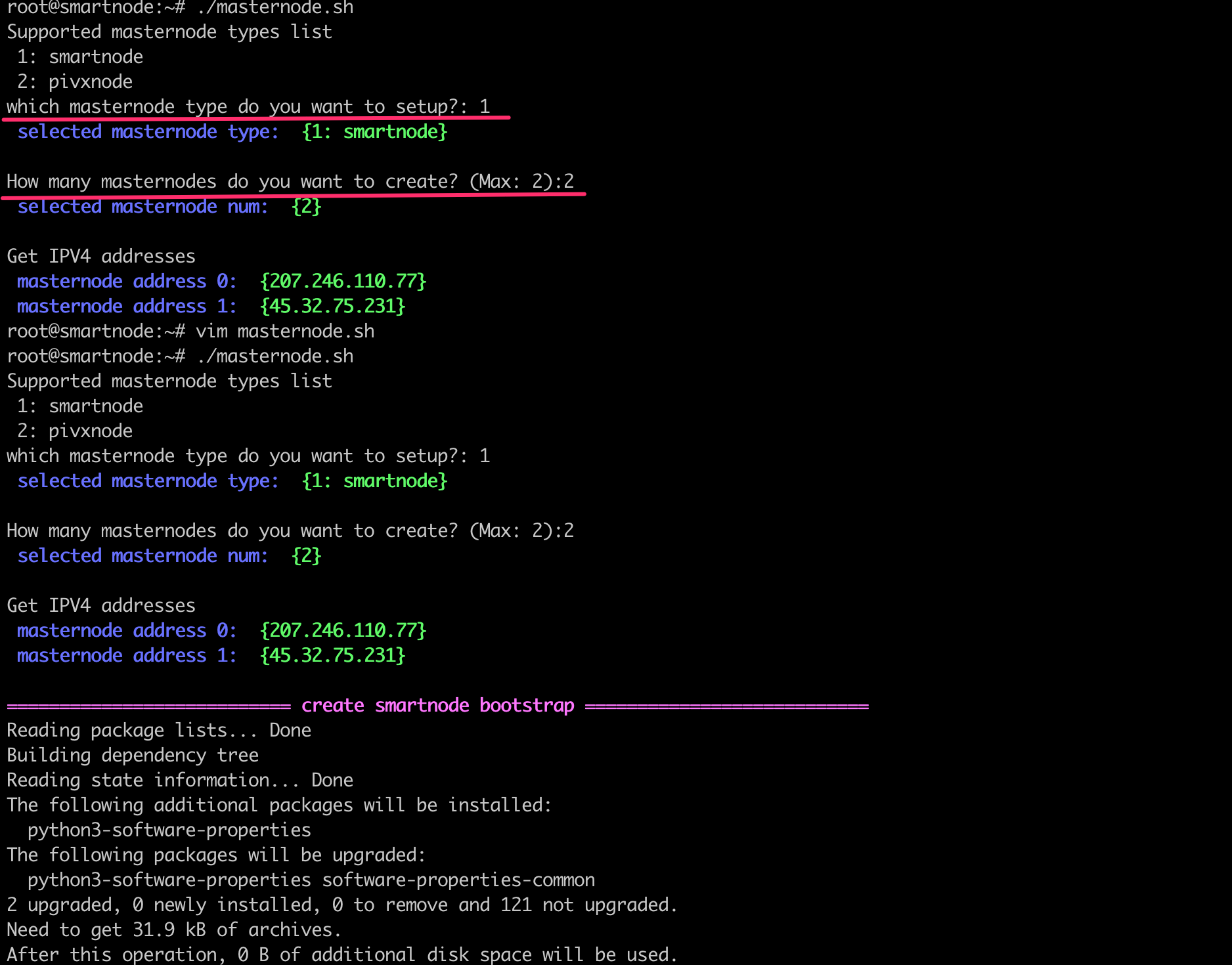
第一步:选择要安装pivxnode则填入2。
第二步:选择要安装pivxnode的节点数量。
如下图中(Max :4)代表根据内存大小,最多能在此VPS上部署4个pivxnode节点,但VPS上实际只有3个公网的IPV4地址,所以选择3。`
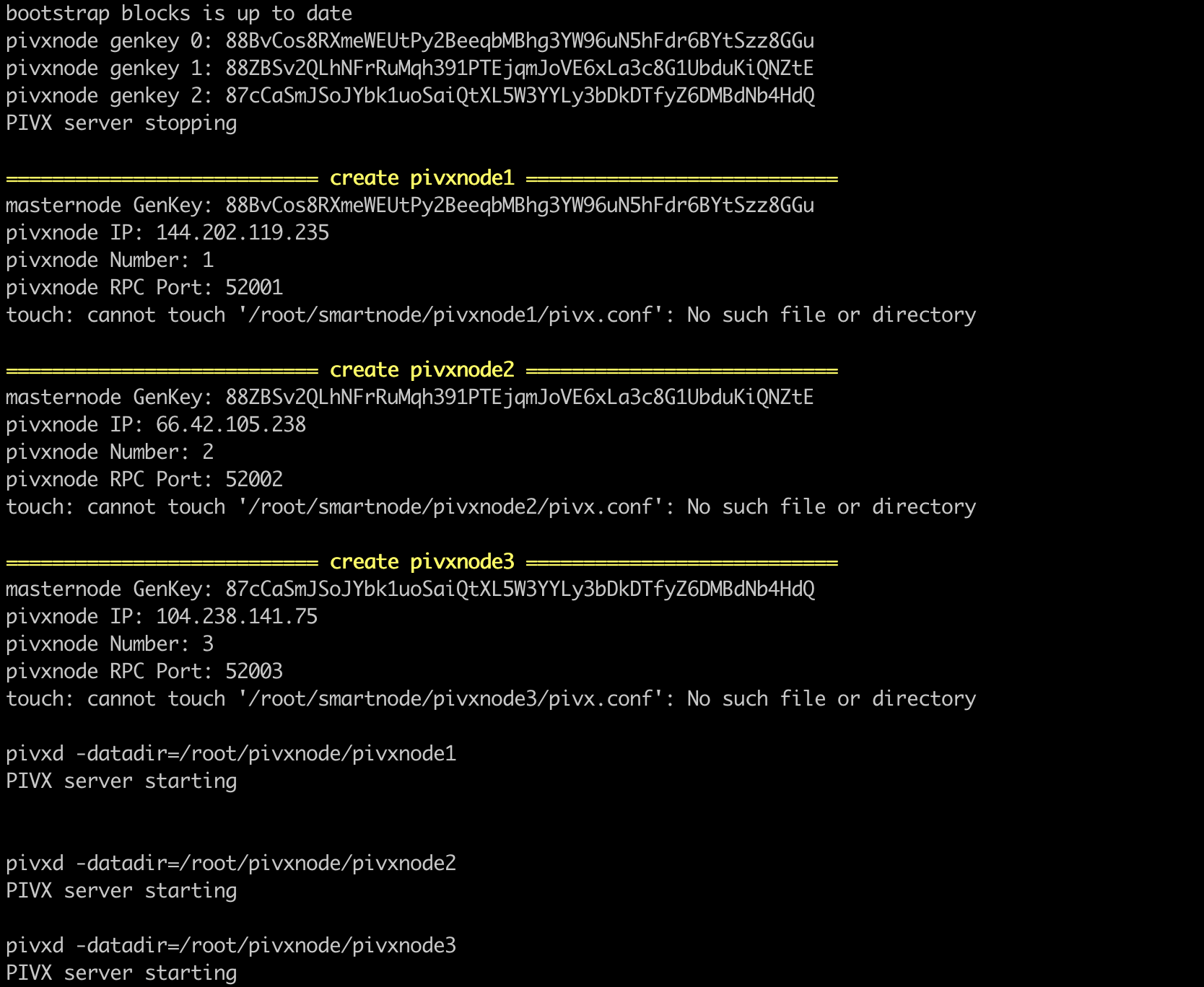
masternode.sh在安装过程中会先建立一个名为bootstrap的pivx masternode节点,当bootstrap的节点同步到最新的block区块后,masternode.sh将会根据用户选择的masternode节点数量将bootstrap拷贝成新的pivxnode1、pivxnode2 pivxnode3…节点目录,并在每个节点目录下生成pivx.conf文件。
出现以下log时,代表pivxnode1、pivxnode2和pivxnode3已安装完毕,但pivx的block同步仍在进行
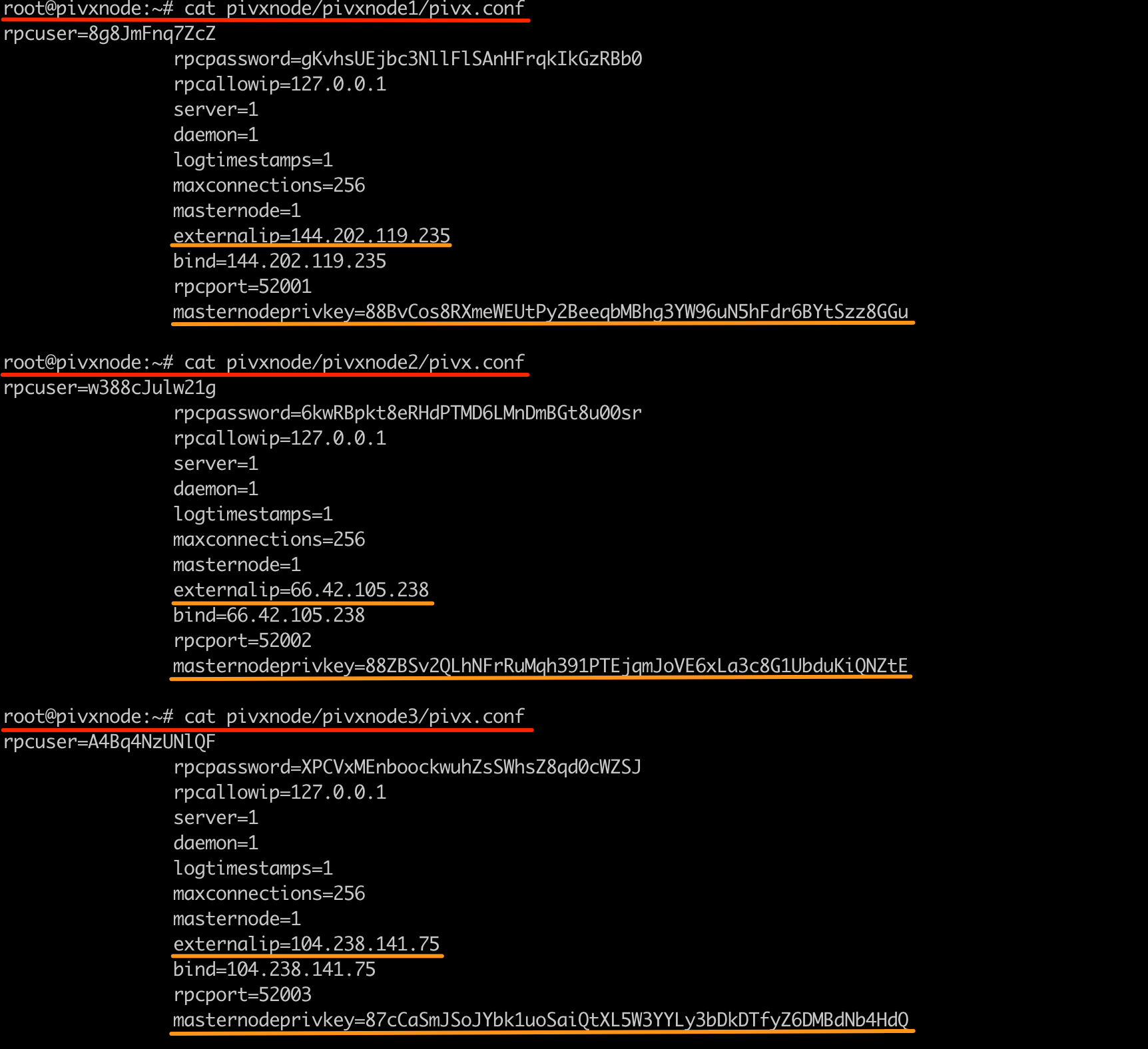
查看pivxnode1、pivxnode2 和 pivxnode3目录下的pivx.conf文件,这个文件中的externalip和masternodeprivkey分别用于稍后在pivx客户端钱包中建立masternode主节点, masternodeprivkey就是pivx钱包中的pubkey。
使用如下命令可以查看pivx masternode节点的block数量是否已经同步到最新
pivx-cli -datadir=/root/pivxnode/pivxnode1 getinfo
pivx-cli -datadir=/root/pivxnode/pivxnode2 getinfo
pivx-cli -datadir=/root/pivxnode/pivxnode3 getinfo
root@pivxnode:~# pivx-cli -datadir=/root/pivxnode/pivxnode1 getinfo
{
  "version": 3010100,
  "protocolversion": 70914,
  "walletversion": 61000,
  "balance": 0.00000000,
  "zerocoinbalance": 0.00000000,
  "blocks": 958277,
  "timeoffset": 0,
  "connections": 16,
  "proxy": "",
  "difficulty": 144382.7304786609,
  "testnet": false,
  "moneysupply": 55192482.64003127,
  "zPIVsupply": {
    "1": 7740.00000000,
    "5": 11410.00000000,
    "10": 49170.00000000,
    "50": 62350.00000000,
    "100": 196900.00000000,
    "500": 217000.00000000,
    "1000": 439000.00000000,
    "5000": 490000.00000000,
    "total": 1473570.00000000
  },
  "keypoololdest": 1547702962,
  "keypoolsize": 1001,
  "paytxfee": 0.00000000,
  "relayfee": 0.00010000,
  "staking status": "Staking Not Active",
  "errors": ""
}
root@pivxnode:~# pivx-cli -datadir=/root/pivxnode/pivxnode2 getinfo
{
  "version": 3010100,
  "protocolversion": 70914,
  "walletversion": 61000,
  "balance": 0.00000000,
  "zerocoinbalance": 0.00000000,
  "blocks": 958090,
  "timeoffset": 0,
  "connections": 16,
  "proxy": "",
  "difficulty": 185535.0886649258,
  "testnet": false,
  "moneysupply": 55191642.83025573,
  "zPIVsupply": {
    "1": 7718.00000000,
    "5": 11400.00000000,
    "10": 49070.00000000,
    "50": 62250.00000000,
    "100": 196600.00000000,
    "500": 216500.00000000,
    "1000": 438000.00000000,
    "5000": 490000.00000000,
    "total": 1471538.00000000
  },
  "keypoololdest": 1547702967,
  "keypoolsize": 1001,
  "paytxfee": 0.00000000,
  "relayfee": 0.00010000,
  "staking status": "Staking Not Active",
  "errors": ""
}
root@pivxnode:~# pivx-cli -datadir=/root/pivxnode/pivxnode3 getinfo
{
  "version": 3010100,
  "protocolversion": 70914,
  "walletversion": 61000,
  "balance": 0.00000000,
  "zerocoinbalance": 0.00000000,
  "blocks": 960782,
  "timeoffset": 0,
  "connections": 16,
  "proxy": "",
  "difficulty": 195970.2221113195,
  "testnet": false,
  "moneysupply": 55203733.43960619,
  "zPIVsupply": {
    "1": 8044.00000000,
    "5": 11485.00000000,
    "10": 49580.00000000,
    "50": 62000.00000000,
    "100": 194600.00000000,
    "500": 217500.00000000,
    "1000": 439000.00000000,
    "5000": 500000.00000000,
    "total": 1482209.00000000
  },
  "keypoololdest": 1547702972,
  "keypoolsize": 1001,
  "paytxfee": 0.00000000,
  "relayfee": 0.00010000,
  "staking status": "Staking Not Active",
  "errors": ""
}
使用如下命令可以查看pivx masternode与pivx钱包的连接状态
pivx-cli -datadir=/root/pivxnode/pivxnode1 masternode status
pivx-cli -datadir=/root/pivxnode/pivxnode2 masternode status
pivx-cli -datadir=/root/pivxnode/pivxnode3 masternode status
root@pivxnode:~# pivx-cli -datadir=/root/pivxnode/pivxnode1 masternode status
error: {"code":-1,"message":"Masternode not found in the list of available masternodes. Current status: Node just started, not yet activated"}
root@pivxnode:~# pivx-cli -datadir=/root/pivxnode/pivxnode2 masternode status
error: {"code":-1,"message":"Masternode not found in the list of available masternodes. Current status: Node just started, not yet activated"}
root@pivxnode:~# pivx-cli -datadir=/root/pivxnode/pivxnode3 masternode status
error: {"code":-1,"message":"Masternode not found in the list of available masternodes. Current status: Node just started, not yet activated"}
二、pivx钱包设置